Locksmith Near Me on Maps: How to Find Us Easily on Google Maps
If you ever need a locksmith in Miami — whether for a car lockout, key replacement, or an emergency — time and clarity matter. That’s why finding a reliable locksmith near me on Google Maps should be quick and straightforward. Here’s how to locate us – plus some familiar nearby landmarks so you know exactly where to find us, even in traffic.
Locksmith Near Me Miami
12/16/20253 min read
📍 Our Exact Address in Miami
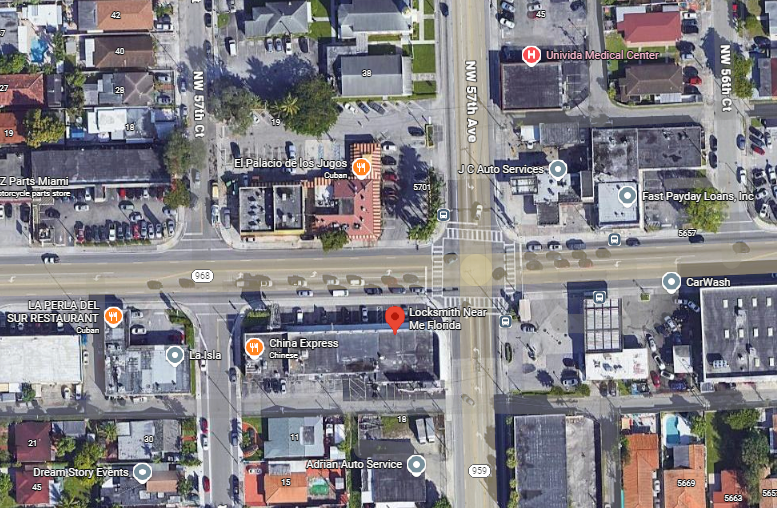
5700 W Flagler St, Miami, FL 33144, United States — that’s where our headquarters and mobile dispatch are based.
From this central location, we can quickly reach many neighborhoods and major traffic routes, which helps us respond quickly to emergency calls across the city.
📌 Nearby Landmarks to Help You Find Us
When you open Google Maps, having some recognizable nearby places helps you confirm you're heading in the right direction. Here are a few landmarks close to our address:
El Palacio de los Jugos (5721 W Flagler St) — A well-known Cuban restaurant, just a few blocks away from us, ideal as a point of reference. MapQuest+1
Flagler Memorial Park — A recognized landmark in Miami. It can help you orient yourself if you come from the north or west. MapQuest
Miami International Airport (MIA) — We’re only a short drive from the airport, making it easier for arriving travelers to find us fast if they face key or lock issues soon after arrival. Apartments.com+1
Using these landmarks in your search or when giving directions can make it easier to find us — even under stress or traffic.
Why It’s Important to Use Google Maps for Locksmith Services
Google Maps isn’t just a navigation tool — it’s also a trust and verification platform. With the help of Maps you can:
Verify our address and contact information — avoid fake or scam listings.
Check opening hours and service availability.
Read real customer reviews to see how we handle emergencies.
Get instant directions whether you drive, use rideshare, or public transport.
Call us directly — the “Call Now” button connects you immediately to our team.
All of that ensures you pick a real, reliable locksmith, not an unknown call center or unmarked van.
🔎 How to Find Us: Step-by-Step on Google Maps
1. Search by Name
Type “Locksmith Near Me Miami”, “Locksmith Near Me 5700 W Flagler St”, or similar — our profile should come up among the first results thanks to proximity, accurate tagging, and good reviews.
2. Search by Address
If you want to be exact, use our full address. Maps will drop a pin directly at our location, showing directions, photos, contact info, and estimated arrival times.
3. Look for Nearby Landmarks in the Map Preview
If you see landmarks like El Palacio de los Jugos, or proximity to Miami International Airport on the map, you know you’re close. This helps especially if you’re unfamiliar with the area.
4. Use “Directions” from Your Location
Regardless of where you are — home, work, a restaurant, or the airport — Maps gives you step-by-step navigation and approximate travel time.
5. Save Our Location for Future Emergencies
Click “Save” → “Favorites” (or “Star”) in Google Maps. That way you’ll find us fast next time you need help.
✅ What You’ll See on Our Google Maps Profile
Verified business name and address.
Real customer reviews and star rating.
Photos: storefront, our service vans, key-cutting equipment, etc.
Buttons for “Call” and “Get Directions.”
Service hours and notes (24/7 availability, mobile service, etc.).
This transparency helps you feel secure about calling us — especially in lockouts or emergencies when you have no time to waste.
🚗 Why Our Location & Map Presence Matters in Miami
Miami is full of traffic congestion, one-way streets, and busy areas. Being located on W Flagler St gives us fast access to major roads and quick dispatch across the city.
Because we’re close to landmarks like Miami International Airport, Flagler Memorial Park, and central shopping/restaurant zones like El Palacio de los Jugos, we can often reach clients in under 15–25 minutes, even during rush hour — a huge advantage when you’re locked out or need key replacement fast.
📝 Pro Tips for Using Google Maps in Emergencies
Save our pin ahead of time — don’t wait until you’re locked out.
Share the pin with family or friends who might need locksmith services.
Check reviews and photos to ensure you’re calling a real locksmith.
Use “Call” feature directly from the listing — it’s faster than searching for a number somewhere else.
Use landmarks as reference points when giving directions (e.g., “near the restaurant on W Flagler St” or “close to the airport”) — helps in distracted or stressful situations.
FAQ: Finding a Locksmith on Google Maps
Q: How can I be sure a locksmith on Maps is real and not a scam?
A: Look for a full verified address, consistent customer reviews, photos, and a working contact number. Our listing includes all these — plus 24/7 availability and mobile service.
Q: Can I reach you from Miami International Airport quickly?
A: Yes — we’re only a few miles away and typically offer fast dispatch for arriving travelers needing key or lock services.
Q: What if I don’t know the exact address — can I still find you?
A: Absolutely. Searching by business name or by services like “car locksmith near me” usually brings up our profile thanks to Google’s ranking and proximity algorithm.
Q: Is it better to use a local locksmith than a generic chain listing?
A: Yes. A local locksmith with verified location, fast response time, and transparent info ensures quicker, safer service — especially in emergencies.
Locksmith Near Me Florida
Car Keys and Remotes – Your Trusted Automotive Locksmith
Contact
Quick Contact Form
+1 (305) 316-3121
+1 (305) 846-4652
© 2024. All rights reserved.